A YouTube Story Series With the Same AI Characters
AI video for YouTube storytelling needs the same characters in every episode. How to reuse reference sheets, budget credits per episode, and label AI videos.
By Hyperdream Team7 min read

To keep the same characters across a YouTube story series, make one reference sheet per character before episode 1 and give that sheet to every shot in every episode. On Hyperdream the sheets are kept in the Library, and a new film can take an earlier film as a reference, so episode 2 starts from episode 1's cast and look. A 3-minute narrated episode budgets at about 850 credits (rates checked 10 November 2026).
Key takeaways
- One sheet per character, made once. Four full-body views, head to toe, and four expressions.
- The series bible is five things: the sheets, the places, the look, the voices and the music.
- About 850 credits for a 3-minute narrated episode at 720p. About 290 for a 60-second one.
- Director needs the Pro plan: $99 a month with 2,000 credits. That is about two narrated episodes a month.
- YouTube asks you to disclose realistic AI content. Clearly animated styles do not need the label.
Why do characters change between episodes?
A video model makes one clip from what you give it. It does not remember last week's hero. If episode 2 starts from a fresh description, you get a cousin of your character, not the character.
When we asked ChatGPT on 10 November 2026 which tool to use for a YouTube storytelling channel with the same characters in every episode, it named five model platforms: Runway, Kling, Luma, Higgsfield and Pika. Any of them can make a good clip. The series problem is a different one. Something has to hold the character between clips and between episodes. Character consistency in AI video covers the methods.
What goes in a series bible?
Five things, settled before episode 1 and reused without change.
| What | Fixed once | Used in every episode as |
|---|---|---|
| Characters | One reference sheet each | A reference for every frame and shot they are in |
| Places | One sheet per recurring place | A reference for every shot set there |
| Look | Palette, lens, grain, shape | The same settings on every film |
| Voices | One narrator voice. One voice per speaking character | The same picks, by name |
| Music | A theme, plus a bed per mood | The same tracks from the Library |
The sheet is the part people skip. How to make a character reference sheet shows what a good one looks like.
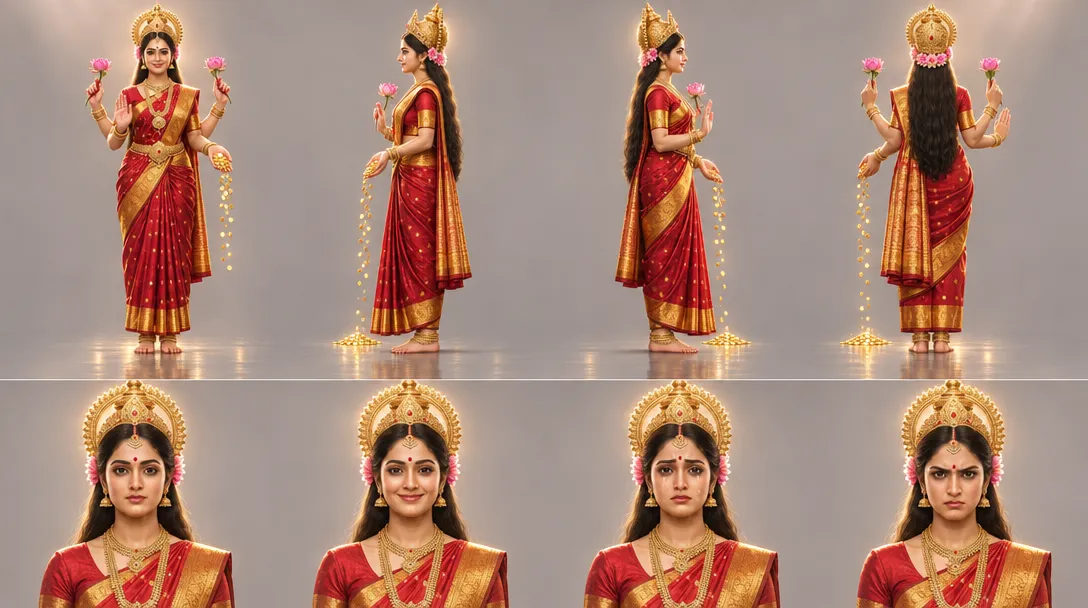 A character reference sheet made on Hyperdream: four full-body views on top, four expressions below
One rule protects the series: never redraw an approved sheet. If the hero needs a winter coat, make a second sheet for that outfit and keep the first.
How do you reuse the cast in the next episode?
Three ways on Hyperdream. All three use things you made for episode 1.
- Add episode 1 as a reference. When you start a film in Director, the references you can add include characters, images and earlier films. Add episode 1 and say what it is for: "use the cast and the look from this film".
- Add the sheets from the Library. Every sheet is a file in the Library. Keep them in one folder for the series and add them to the new film.
- Duplicate the film. In Projects, duplicate episode 1, rename it, and write the new script in the copy.
Whichever you use, open Cast and Places before you render anything and compare each sheet with episode 1's. We have not published a test of how closely a second film's sheets match the first's, so this check is worth the minute it takes.
For single clips outside a film, Create works the same way. Pick the sheet from the Library as a reference and mention it in the prompt with @name.
What does one episode cost in credits?
Here is a plan for a 3-minute narrated episode: 30 shots of 6 seconds, a narrator, no one speaking on camera. Rates are from the live model list on 10 November 2026, at 720p, using whole-number rates.
| Item | Plan for | Model | Credits |
|---|---|---|---|
| First frames | 30 shots, 45 tries | Nano Banana 2.1, 2 an image | 90 |
| Video, one take of every shot | 180 seconds | MiniMax H3, 2 a second | 360 |
| Video, second takes | Another 180 seconds | The same | 360 |
| Narration | About 450 words | Eleven v3, 3 per 1,000 characters | 9 |
| Music | One track of up to 180 seconds | Stable Audio 2.5, 6 a track | 6 |
| Sound effects | About 10 | Eleven Sound Effects, 1 to 2 each | 20 |
| Total | about 850 |
Three notes on that table.
Why double the video? Because no film gets every shot on the first take. Our own films took 1.8 to 2.3 renders per finished shot, and one ad with dialogue took 4.4.
MiniMax H3 takes no reference pictures. It works from a start frame. So the character has to be right in the frame, which is drawn from the sheet by the image model. For shots where a character turns or moves a lot, use a model that takes the sheet itself: MiniMax H3 Max or Gemini Omni 1.2, both 3 credits a second. With those for every shot, the episode comes to about 1,210.
The sheets are a one-off. Two characters and three places, with a few tries each, cost about 24 credits before episode 1. After that the saving is not credits. It is that the cast is already approved.
Other formats, on the same method:
| Episode | Shots | Credits |
|---|---|---|
| 60-second narrated story, 9:16 | 12 | About 290 |
| 3-minute narrated story | 30 | About 850 |
| 3-minute story with dialogue on camera | 30 | About 1,310 |
The dialogue figure is from our 3-minute short film plan, less the sheets.
On Pro, 2,000 credits a month covers two narrated 3-minute episodes with room for one short. Business, at $199 with 4,000 credits, covers four. Extra credits come in packs: 1,350 for $79. Planning with Director uses the Director allowance, not credits, and exporting is free.
How do you make an episode in Hyperdream?
- Open Director, type the episode's idea, add the references above and pick the shape: 16:9 for a normal upload, 9:16 for Shorts.
- Script. Paste your script or have Director write it. Keep the recurring names exactly the same.
- Look. Use the series settings. Set render quality to Draft (720p) while you find the shots.
- Cast and Places. Check every sheet against episode 1.
- Storyboard. Get a still frame for every shot and fix any face that is off now. A still costs 2 credits. A clip costs 12 or more.
- Sound. Pick the same narrator voice as last time. For a character who speaks on camera, "Change the voice" says their lines again in the voice you pick, so they sound the same in every episode.
- Shots. Render. Three run at a time.
- Edit. Add captions and the end card, then export one MP4 at up to 1080p. You upload it to YouTube yourself.
If you want both a wide episode and a vertical cut, plan the vertical one as its own short film. The Every shape tool renders a clip again in another shape at 6 credits a second, which is 360 credits for a minute.
The page for building a cast is /ai-character-generator.
What are YouTube's rules for AI story videos?
Two pages matter. Both were read on 10 November 2026.
Disclosure. YouTube's help page says: "We require creators to disclose AI-generated or altered content that seems realistic." It also says creators "don't need to disclose non-realistic content that's made with AI", and gives animation and fantasy as examples. You set this when you upload, in YouTube Studio. The page adds that disclosing alone will not limit a video's audience or its eligibility to earn money.
So a photoreal series most likely needs the label, and a clearly animated or fantastical one most likely does not. If you are unsure, label it.
Monetisation. YouTube's channel monetisation policies say content should "Not be mass-produced, generic, repetitive, or manipulative". For a story channel that means a new story each time, not one episode with the names swapped.
Rights on our side. On Hyperdream, work made on any paid plan is labelled "Yours to use commercially". Work made on the free credits is "For personal projects". One trap for a series: songs made with Audio One are for personal use only on every plan, so do not use one as your theme song. Use Stable Audio 2.5, Lyria 2 or Eleven Music. This is a summary, not legal advice.
Where does this fall short?
- Price. Director is on the $99 Pro plan. Model platforms cost less if you only need clips.
- No series test yet. We have made single films for clients, not a multi-episode series. The method above is the one those films used, applied again.
- A sheet is not a guarantee. One of our films used a sheet in every render and still took 2.1 renders per finished shot.
- Captions are English only.
- Export is 1080p at most.
How we checked
Hyperdream's rates, plans and features were read from its live pricing and model data on 10 November 2026. The episode budgets are worked out from those rates. They are plans, not records of finished episodes. The renders-per-shot figures come from the project records of four client films. YouTube's two help pages were read the same day, and neither shows a "last updated" date. The ChatGPT answer is from one logged chat that day. We could not confirm how closely the sheets in a second film match the first's without a published test, and we have not checked how YouTube applies its monetisation policy to any real AI channel.
Questions people ask
Make one reference sheet per character before episode 1 and never redraw it. Give that sheet to every frame and every shot in every episode, and keep the look, the places and the voices fixed the same way.
Keep reading
Comparisons21 November 20269 min read
AI Music Video Tools That Keep the Same Singer (2026)
Which AI music video generator keeps a consistent character? Seven tools compared from their own pages: song upload, beat sync, lip sync, price. 10 Nov 2026.
Models20 November 20267 min read
Kling O3 Pro: Holding a Character From Reference Pictures
Kling O3 Pro on Hyperdream: up to 4 reference pictures, a start and end frame, 3 to 15 second clips at 4 credits a second, and how it differs from Kling 4.0.
Guides20 November 20267 min read
Two Characters in One AI Shot Without Mixed-Up Faces
How to get multiple consistent characters in one AI video shot: a sheet each, names in the prompt, a still frame first, and the reference limits by model.
More than images and video
Scripts, storyboards, motion, and characters in every version. Each one on its own, or all of them in a film.

Write a script
An idea in, a properly formatted screenplay out. Edit any line, then board it or film it.

Board a storyboard
A panel for every shot, as AI stills or quick vector frames. Export it as a pitch deck.

Make motion
Titles, explainers and moving storyboards, drawn as vector animation by the AI you pick.

Characters, places, products
One subject in many versions, or new ideas for it. Every angle, look and light.
Your first film is one sentence away.
Free to start. Pay only for what you render.