How to Make a Character Reference Sheet for AI Video
A character reference sheet for AI video shows one character in four full-body views and four expressions. How to make one, check it and use it in every shot.
By Hyperdream Team7 min read
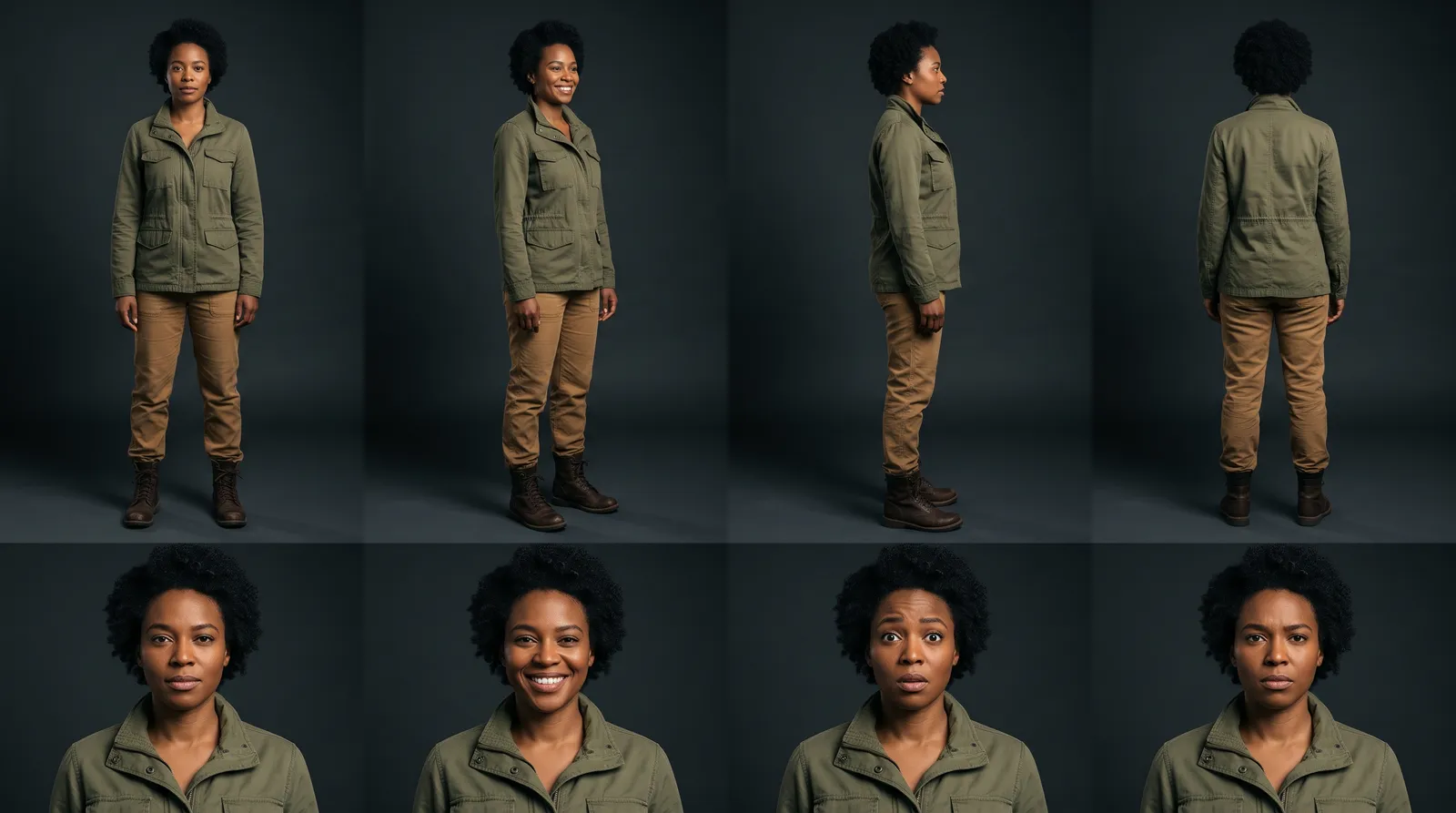
A character reference sheet is one image that shows a single character from every side: four full-body views from head to toe, plus four facial expressions. You hand that sheet to the image or video model as a reference in every shot, so the model copies a known person and does not invent a new one each time.
Key takeaways
- The layout: four full-body views (front, two sides, back) and four expressions, on a plain background, in one image.
- One sheet per character. Approve it once and use it in every shot. Changing it mid-film is how drift starts.
- Models differ. Gemini Omni 1.2 takes up to 10 reference pictures, MiniMax H3 Max and Wan 3.0 up to 9, Kling O3 Pro and both Seedance models up to 4 (checked 10 November 2026).
- Expect a few tries. In one real project, 12 character sheets cost 45 credits. Nine of them were thrown out before one was approved.
- A sheet is not a guarantee. The same project still took 2.1 video renders per finished shot.
What is a character reference sheet?
It is the AI version of something animation studios have used for decades: a model sheet. One page fixes what a character looks like, so every artist draws the same person.
You will see three names for it. A character sheet and a character reference sheet are the same thing. A character turnaround is the row of views that turns the character around: front, side, back. A full reference sheet is the turnaround plus a row of expressions.
In AI video the sheet does the job of the casting photo, the costume fitting and the make-up test at once. The model has no memory between shots. The sheet is the memory. For the wider problem, see how to keep characters consistent.
Why does a sheet beat one picture or a written description?
A written description gets re-read fresh every time. "A woman in her thirties with dark hair and a red coat" describes thousands of different women, and the model picks a new one for each shot.
A single close-up is better, but it leaves most of the character unknown. The model has to guess the body, the height, the back of the hair, the shoes and how the costume hangs. Each guess can differ from shot to shot.
A sheet answers those questions in advance:
- Head to toe fixes proportions, costume and shoes. A wide shot needs all three.
- Side and back views fix the profile and the hair. An over-the-shoulder shot needs both.
- Expressions show the face under emotion. Without them, a character who smiles can turn into someone else.
What goes on a good sheet?
- One character only. Two people on one sheet get blended.
- Four full-body views, feet in frame: front, both sides, back.
- Four expressions, close on the face. Pick the ones your story needs, such as neutral, happy, sad and angry.
- The same costume in every view, down to jewellery and shoes.
- A plain background and flat, even light. Mood lighting belongs in the shot, not on the sheet.
- A relaxed standing pose. Action poses hide parts of the costume.
- No text labels. Models sometimes copy the text into the shot.
How do you make one, step by step?
-
Write the character in five lines. Age and build. Face. Hair. Costume. One detail that never changes, such as a scar, a ring or a colour.
-
Gather pictures to draw from, if you have them. A costume photo, a face you have rights to use, an earlier design. These guide the sheet. They are not the sheet.
-
Ask an image model for the sheet. Use a model that accepts reference pictures. A prompt that works as a starting point:
Character reference sheet of [description]. Top row: four full-body views from head to toe, front, left side, right side and back, same costume in each. Bottom row: four close views of the face, neutral, happy, sad, angry. Plain light grey background, flat even light, no text.
-
Check it like a continuity supervisor. Is it the same face in all eight views? Same costume? Count the fingers. Look at the feet. Compare the left and right sides.
-
Fix by editing, not by starting again. If seven views are right and one is wrong, ask for that one change. A fresh roll changes the seven good ones too.
-
Approve it and stop. From here on the sheet is the character. If the story needs a second costume, make a second sheet and name it clearly.
-
Use it in every shot. Attach the sheet to every still and every clip the character is in, and keep the written description the same each time.
What does a real sheet look like?
This one was made in November 2026 for a mantra video, described in our case study.
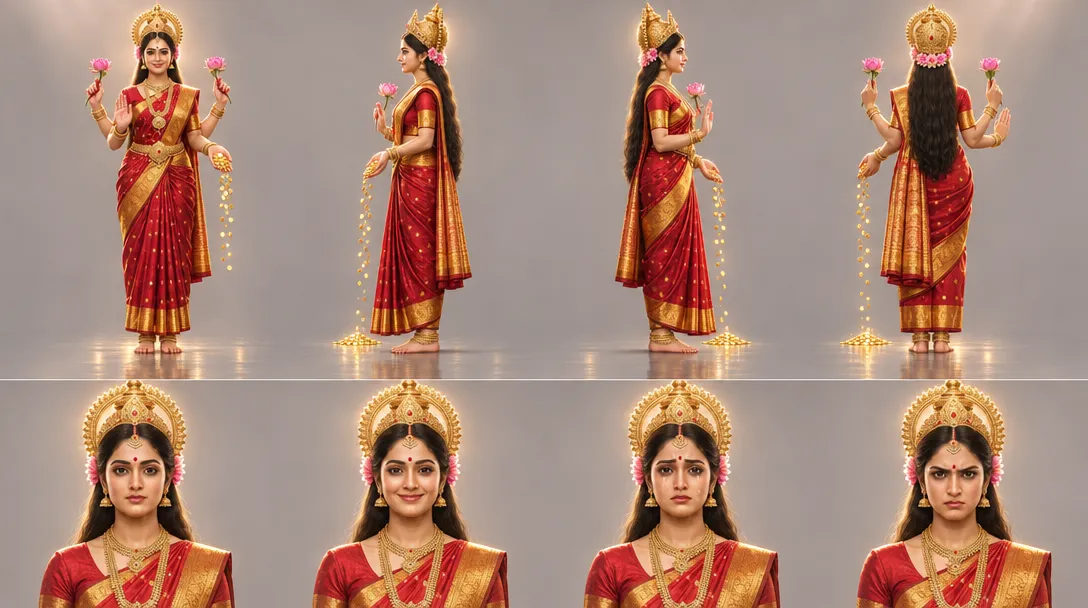 A character reference sheet made on Hyperdream: four full-body views on top, four expressions below
It took work to get there. The first three rounds of designs, nine sheets in all, were rejected. Then two reference pictures were uploaded, a new sheet was drawn from them, and that one was approved three minutes later. It was used in every shot after that. The project made 12 character sheets in total for 45 credits. One rule was written down early and kept: "She can never wear white."
Two things to copy from it. The costume and jewellery match in all four body views. And the expressions change the face without changing the person.
How do you do it in Hyperdream?
In Director (Pro and up), open the Cast step. Each character has a name, a role, a description, a "how they sound" line, a place for "Pictures to draw from", and one "Reference sheet".
- Add the character and write the description.
- Add any pictures to "Pictures to draw from". They are what the sheet is drawn from. The sheet, not the upload, is what the shots use.
- Make the reference sheet. In Agent mode, Director can make it for you and shows the cost first. In Plan mode it proposes and waits.
- Look at the sheet, ask for changes, and keep the version you approve.
- Do the same in the Places step. A place's sheet shows the wide, the reverse, the middle and the details. A product's shows every side and the details.
From there, Storyboard draws each shot's first frame with the sheets, and Shots renders the video.
In Create (every plan), choose Image, set "What is it" to Character, and describe the sheet. The result lands in your Library. Add it as a reference in later prompts and mention it with @name. An image costs 2 credits on Nano Banana 2.1, which takes up to 10 reference pictures (checked 10 November 2026). The AI character generator page shows the flow.
How many reference pictures can each video model take?
Checked on /models and in the app on 10 November 2026:
| Video model | Reference pictures | Start frame |
|---|---|---|
| Gemini Omni 1.2 | Up to 10 | Yes |
| MiniMax H3 Max | Up to 9 | Yes |
| Wan 3.0 | Up to 9 | Yes |
| Kling O3 Pro | Up to 4 | Yes |
| Seedance 2.0 | Up to 4 | Yes |
| Seedance 2.5 | Up to 4 | Yes |
| MiniMax H3, FLUX 3 Max, Kling 4.0, Grok Imagine 1.5 | None | Yes |
For the last four, the sheet still matters. You use it to draw the shot's first frame as a still, then render the clip from that frame. The full comparison is in AI video models compared.
Where does a sheet stop helping?
- Two characters in one shot. Two sheets in one render is harder than one. Run the 20-second two-character test before you plan a film around it.
- Voice. A sheet fixes the look, not the sound. The voice is set separately.
- Re-rolls. The mantra project gave every video render the approved sheet and a start frame, and it still took 19 renders to get 9 finished shots.
- Big changes of age or costume. Treat those as a new character with a new sheet.
For the whole process around the sheet, read how to make a movie with AI.
How we checked
Model limits and prices were read from the live Hyperdream model list and /models on 10 November 2026. The numbers for the real sheet come from that project's records: 12 character sheets, 45 credits, 19 video renders for 9 finished shots. The step-by-step method is standard model-sheet practice applied to image models. We have not run a side-by-side test of sheet layouts, so we make no claim that eight views beat six.
Questions people ask
It is one image that shows a single character from every side: full-body views from head to toe plus a row of facial expressions. You give it to the image or video model as a reference in every shot, so the model copies a known person and does not invent a new one.
Keep reading
Guides10 November 20268 min read
A 3-Minute AI Short Film With Two Characters: Full Plan
A full plan for a 3 minute AI short film with the same two characters in every scene: 30 shots, a model for each, a credit budget and the hours it takes.
Guides10 November 20268 min read
The 20-Second Two-Character Test for Any AI Film Tool
An AI character consistency test you can run on any tool: two characters, two 10-second shots, one scoring sheet. Our run on three models, every take shown.
Guides25 June 20267 min read
How to Keep Characters Consistent Across AI Video Scenes
Character consistency in AI video comes from one reference sheet per character, given to the model on every shot. The steps, the models and real numbers.
More than images and video
Scripts, storyboards, motion, and characters in every version. Each one on its own, or all of them in a film.

Write a script
An idea in, a properly formatted screenplay out. Edit any line, then board it or film it.

Board a storyboard
A panel for every shot, as AI stills or quick vector frames. Export it as a pitch deck.

Make motion
Titles, explainers and moving storyboards, drawn as vector animation by the AI you pick.

Characters, places, products
One subject in many versions, or new ideas for it. Every angle, look and light.
Your first film is one sentence away.
Free to start. Pay only for what you render.