What Is Reference-to-Video? Keeping a Face Across Shots
Reference to video (R2V) means giving an AI video model pictures of the people, places or products that must appear. How it works and which models take it.
By Hyperdream Team3 min read
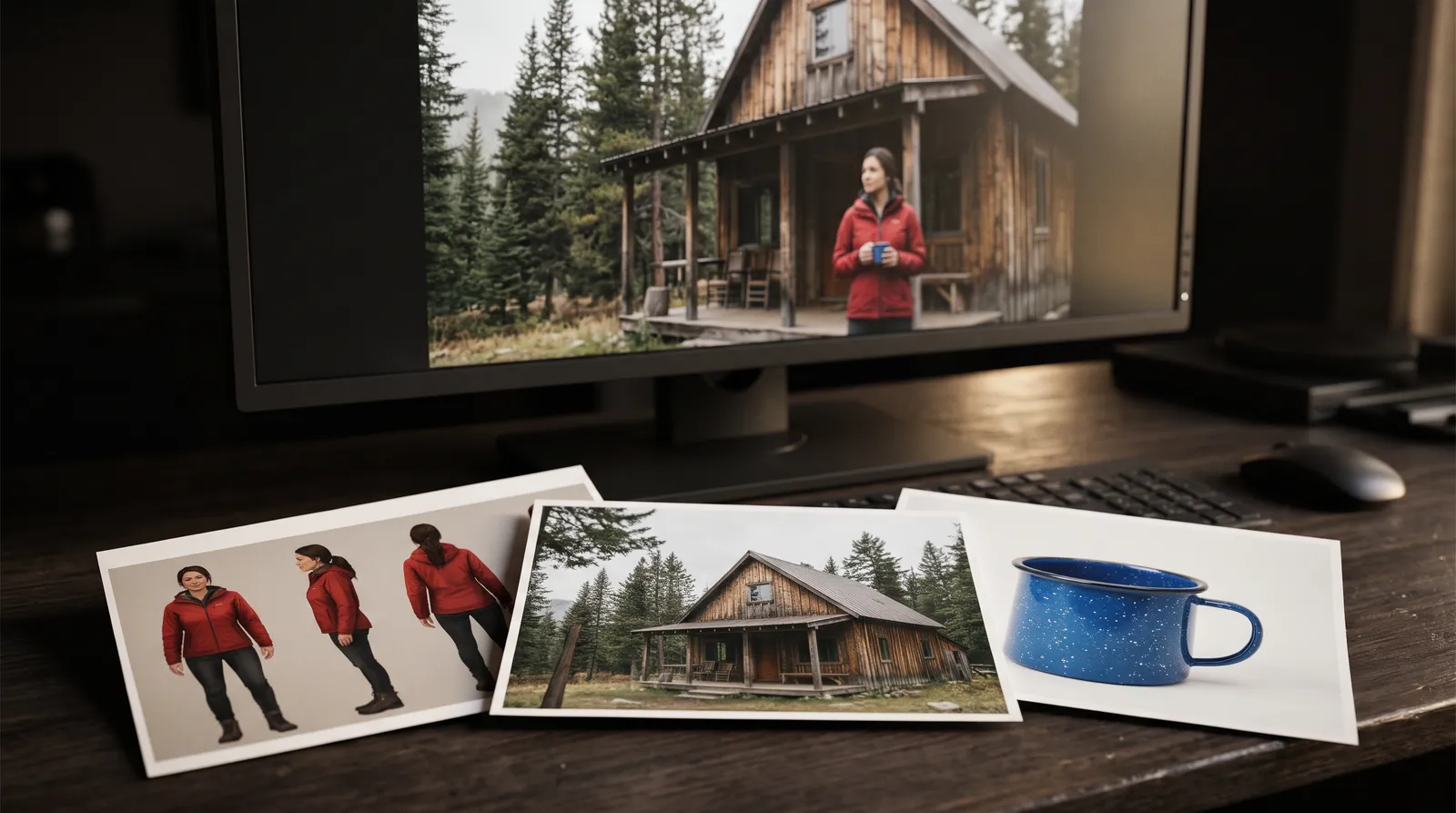
Reference-to-video is a way of making an AI video clip where you give the model one or more pictures of the people, places or products that must appear, and it builds a new shot around them. The pictures guide the look. None of them has to be the first frame. It is often shortened to R2V.
Key takeaways
- R2V: pictures in, a new shot out, with the same face, place or product in it.
- It is not image-to-video. Image-to-video starts the clip on your picture. Reference-to-video only uses your pictures as a guide.
- 6 of Hyperdream's 10 video models take reference pictures, from 4 up to 10 a shot (checked 10 November 2026).
- On one client film, 24 of 40 video renders were reference-to-video.
How is it different from text-to-video and image-to-video?
| Mode | What you give the model | What your picture does | Use it for |
|---|---|---|---|
| Text-to-video | Words only | Nothing. There is no picture | Shots with no recurring person or place |
| Image-to-video | One picture as the start frame | It is the first frame of the clip | A shot you have already framed as a still |
| Reference-to-video | One or more reference pictures | It shows who or what must appear | The same character, place or product in a new framing |
Why does it keep a face the same across shots?
A video model has no memory of your last shot. Words like "a woman in her forties with short grey hair" describe a type, and the model draws a different woman of that type each time. A picture pins down one person.
The best reference is a reference sheet. A character's sheet shows four full-body views, head to toe, and four expressions. See how to make a character reference sheet.
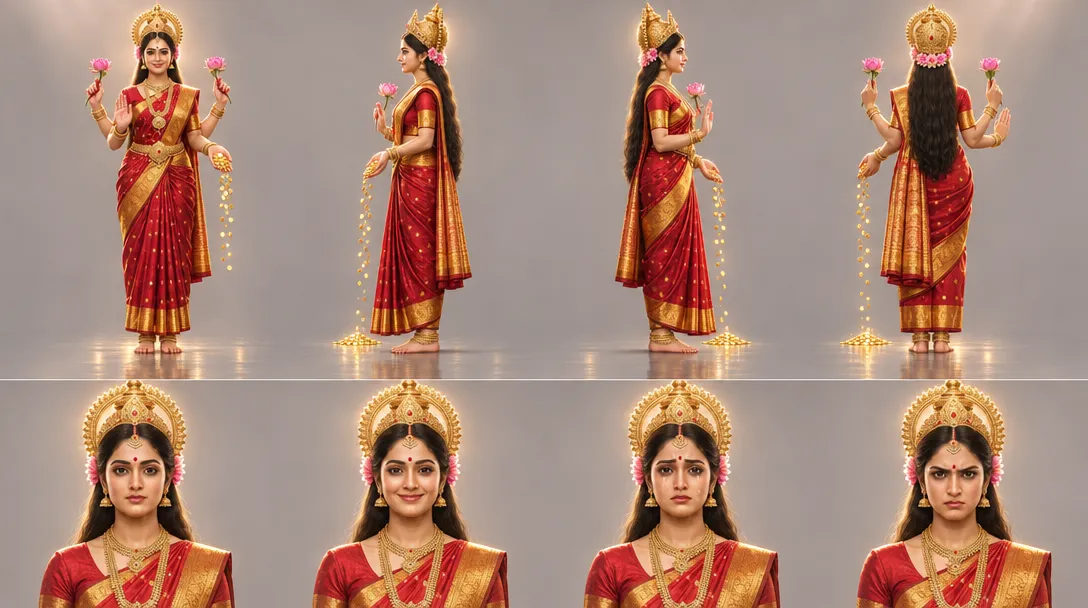 A character reference sheet made on Hyperdream: four full-body views on top, four expressions below
Which video models take reference pictures?
On Hyperdream, read from the models page data on 10 November 2026:
| Model | Maker | Reference pictures a shot | Credits a second | Lowest plan |
|---|---|---|---|---|
| Gemini Omni 1.2 | Up to 10 | 3 | Creator | |
| MiniMax H3 Max | MiniMax | Up to 9 | 3 | Starter |
| Wan 3.0 | Alibaba | Up to 9 | 5 | Creator |
| Kling O3 Pro | Kuaishou | Up to 4 | 4 | Creator |
| Seedance 2.0 | ByteDance | Up to 4 | 9 | Creator |
| Seedance 2.5 | ByteDance | Up to 4 | 7 | Pro |
The other four (MiniMax H3, FLUX 3 Max, Kling 4.0 and Grok Imagine 1.5) take a start frame and no reference pictures. With those, the character has to be in the start frame already.
How well does it work on a real film?
It helps, and it does not make every take right. On the second of two films our team made for MAHA-GFC, 24 of the 40 video renders were reference-to-video, and 13 of the 22 kept shots came from them. The film still averaged 1.8 renders per finished shot (case study). The wider method is in how to keep characters consistent.
How do you use it in Hyperdream?
- One clip: in Create, choose Video and pick a model from the table. Add pictures from the Library or upload them, and mention one in the prompt with
@name. - A film: in Director, make a reference sheet per character in Cast and per location and product in Places. In Shots, pick a model that takes reference pictures.
More terms are in the AI filmmaking glossary. The clip tool is on the AI video generator page.
How we checked
The reference limits, prices and plans were read from Hyperdream's live models data on 10 November 2026. Staff can change them. The film numbers come from the project's own records. We have not published a test of how closely each model holds a face, so nothing here ranks them.
Questions people ask
Reference-to-video is a way of making an AI video clip where you give the model pictures of the people, places or products that must appear. The model builds a new shot around them. The pictures guide the look and are not the first frame.
Keep reading
Glossary21 November 20266 min read
What Is Image-to-Video? Start Frames Explained
What is image to video? An AI video clip that starts on a picture you give the model, called the start frame. How it works and which models take one.
Models20 November 20267 min read
Kling O3 Pro: Holding a Character From Reference Pictures
Kling O3 Pro on Hyperdream: up to 4 reference pictures, a start and end frame, 3 to 15 second clips at 4 credits a second, and how it differs from Kling 4.0.
Guides20 November 20267 min read
Two Characters in One AI Shot Without Mixed-Up Faces
How to get multiple consistent characters in one AI video shot: a sheet each, names in the prompt, a still frame first, and the reference limits by model.
More than images and video
Scripts, storyboards, motion, and characters in every version. Each one on its own, or all of them in a film.

Write a script
An idea in, a properly formatted screenplay out. Edit any line, then board it or film it.

Board a storyboard
A panel for every shot, as AI stills or quick vector frames. Export it as a pitch deck.

Make motion
Titles, explainers and moving storyboards, drawn as vector animation by the AI you pick.

Characters, places, products
One subject in many versions, or new ideas for it. Every angle, look and light.
Your first film is one sentence away.
Free to start. Pay only for what you render.