Hyperdream Now Works in ChatGPT, Claude and Cursor
Add Hyperdream to ChatGPT, Claude, Claude Code or Cursor and make images, video, music and voice from the chat. Same credits, same Library, price shown first.
By Divy Brahmbhatt6 min read
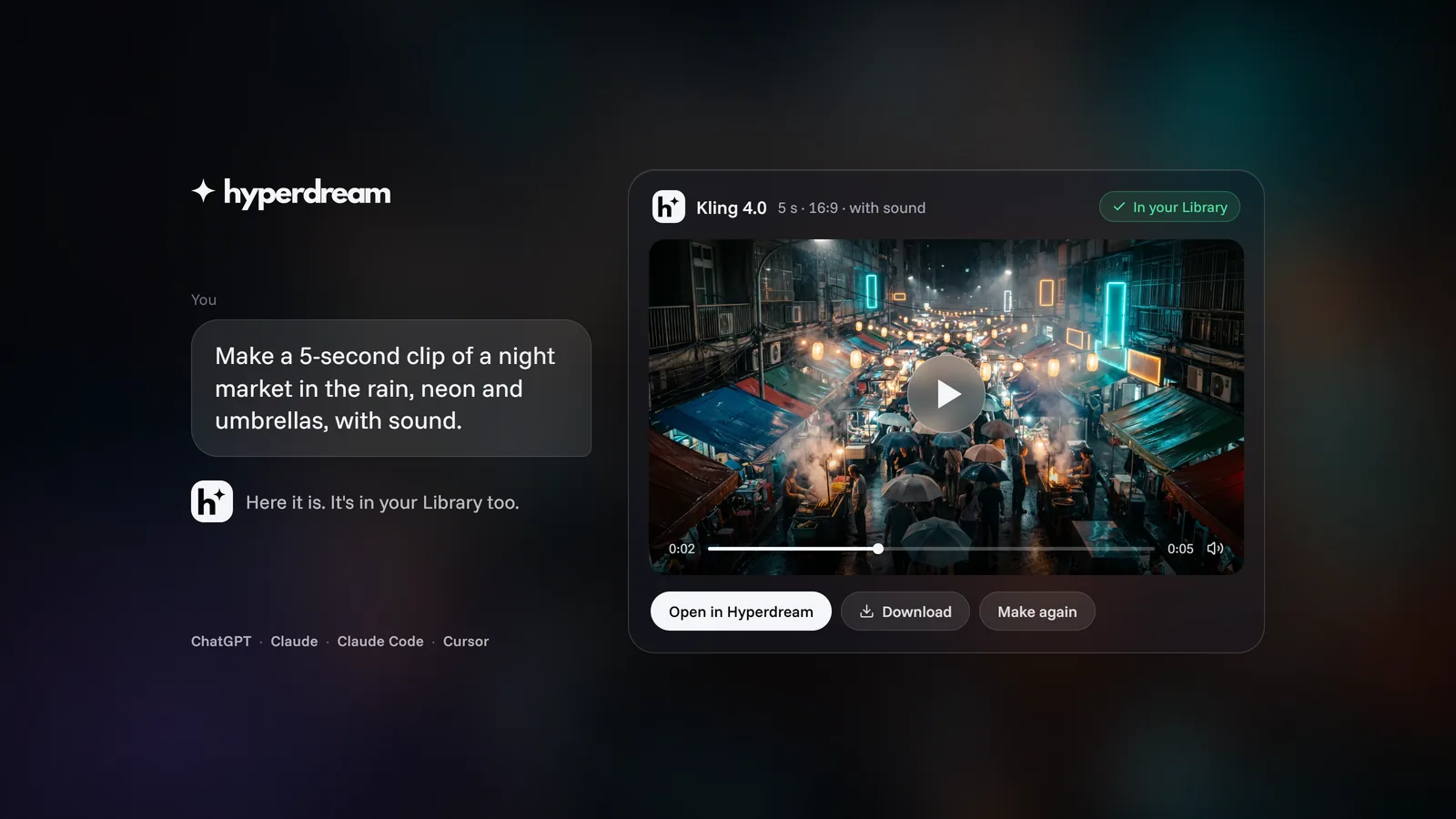
Hyperdream now works inside the AI assistant you already use. Add it to ChatGPT, Claude, Claude Code or Cursor once, then ask for an image, a clip, a song or a whole film in plain words. The assistant shows you the price, Hyperdream makes it, and the result appears in the chat and in your Library at the same moment.
It is live today for every Hyperdream account. There are no API keys: you paste one address, sign in to Hyperdream in your browser, and choose Allow.
Key takeaways
- Four apps: ChatGPT (Plus and Pro), Claude (web, desktop and mobile), Claude Code and Cursor.
- Everything you can make in Create: images, video, music, songs, voice lines and sound effects, plus editing, upscaling, captions and re-voicing.
- Films too, on Pro and up: start a film, write and board it, render the shots, and talk to Director, all from the chat.
- Real cards in ChatGPT and Claude: a model picker with prices, a price card with a Make it button, a render that turns into a player, your film's shot board.
- Same credits, same prices. The price shows before anything is spent. Failed renders refund themselves.
- One Library. Anything made from the chat is in Hyperdream at once, and anything made in Hyperdream can be found from the chat.
Why we built it
A lot of film work starts in a chat. People write the idea, the script and the shot list in ChatGPT or Claude, then copy it into a video tool and start again. The writing and the making lived in different places.
Now they don't have to. The assistant that helped you write the scene can make it, in the same conversation, with the same models and prices you'd get in Hyperdream. When you want the full studio, open Hyperdream and everything is already there.
What can you ask for?
Anything you can make in Create, and on Pro and up, whole films. Four examples, and what happens with each.
"Make a 5-second clip of a night market in the rain, neon and umbrellas, with sound."
The assistant checks your plan and credits, and suggests a video model your plan opens. If you'd rather choose, it shows the model picker: every model with its price and the plan it needs. Then you see a price card with the credits it will cost and your balance after. Press Make it and a render card appears, fills in as the clip is made, and turns into a player when it's done. The clip is already in your Library, with the prompt and model it was made with.
"Upscale the last video I made, then put a deeper male voice on the line."
It finds the clip in your Library and shows it, quotes the upscale, and runs it when you agree. For the voice, it shows a voice card where you can play samples and pick one. The line is re-voiced in that voice. Both results are new versions in your Library, and the original stays as it was.
"Start a 30-second vertical Diwali ad for my sweet shop. Six shots."
On Pro and up, it starts a new film in Projects and writes it: the script, the look, the cast and places, and a six-shot storyboard. It makes the reference sheets that keep each character the same in every shot, then shows the shot board in the chat. Before rendering, it prices the whole film shot by shot, with a Render button on the card. Shots fill in on the board as they land. Open the film in Hyperdream at the same time and you'll see them arrive there too.
When the cut is ready, the assistant gives you a link that opens the film's Edit step in Hyperdream, where the export runs. Edit and export has the details of the file you get.
"Ask Director to tighten scene 2."
On Pro and up, this goes to Director, our film agent. It is the same Director as in the app: the same three modes (Agent does the work, Plan proposes and waits for your go, Ask only answers) and the same allowance. A card shows each step as it finishes. If you'd rather it checked with you first, ask for Plan mode.
In Claude Code and Cursor
Code assistants get the same tools, as text. Ask for "four 16:9 hero images of a lighthouse at dawn for this landing page" and you get back the price, then the finished images as addresses that open without signing in. They're in your Library too.
How do credits work from the chat?
Exactly as in the app. There is no separate price list and no connector fee.
| Who pays | |
|---|---|
| The conversation, the writing and the planning | Your ChatGPT, Claude or Cursor plan |
| Images, video, music, voice and sound | Your Hyperdream credits, at the app's prices |
| Director's planning (Pro and up) | Your Director allowance, the same one as in the app |
- Price first. The assistant is told to quote before it spends, and it does. Every button on a card that spends shows its price.
- Held, then charged. When a render starts, its credits are set aside. They're charged only if it's made. If it fails, they come straight back.
- No double charges. If your app sends the same request again, say after a dropped connection, it gets the first render back and you pay once.
- Short of credits? The assistant tells you how many you need and gives you a link to your Billing page on hyperdream.co. You buy there, the same way as always, then go back to the chat and carry on. There is no checkout inside ChatGPT or Claude.
- Team limits still apply. If you connect a team workspace, its per-person limits and client budgets work the same as in the app.
Plans and credit packs are on /pricing, and every model's price is on /models. Hyperdream pricing explained goes through how plan and pack credits last.
Is it safe to connect?
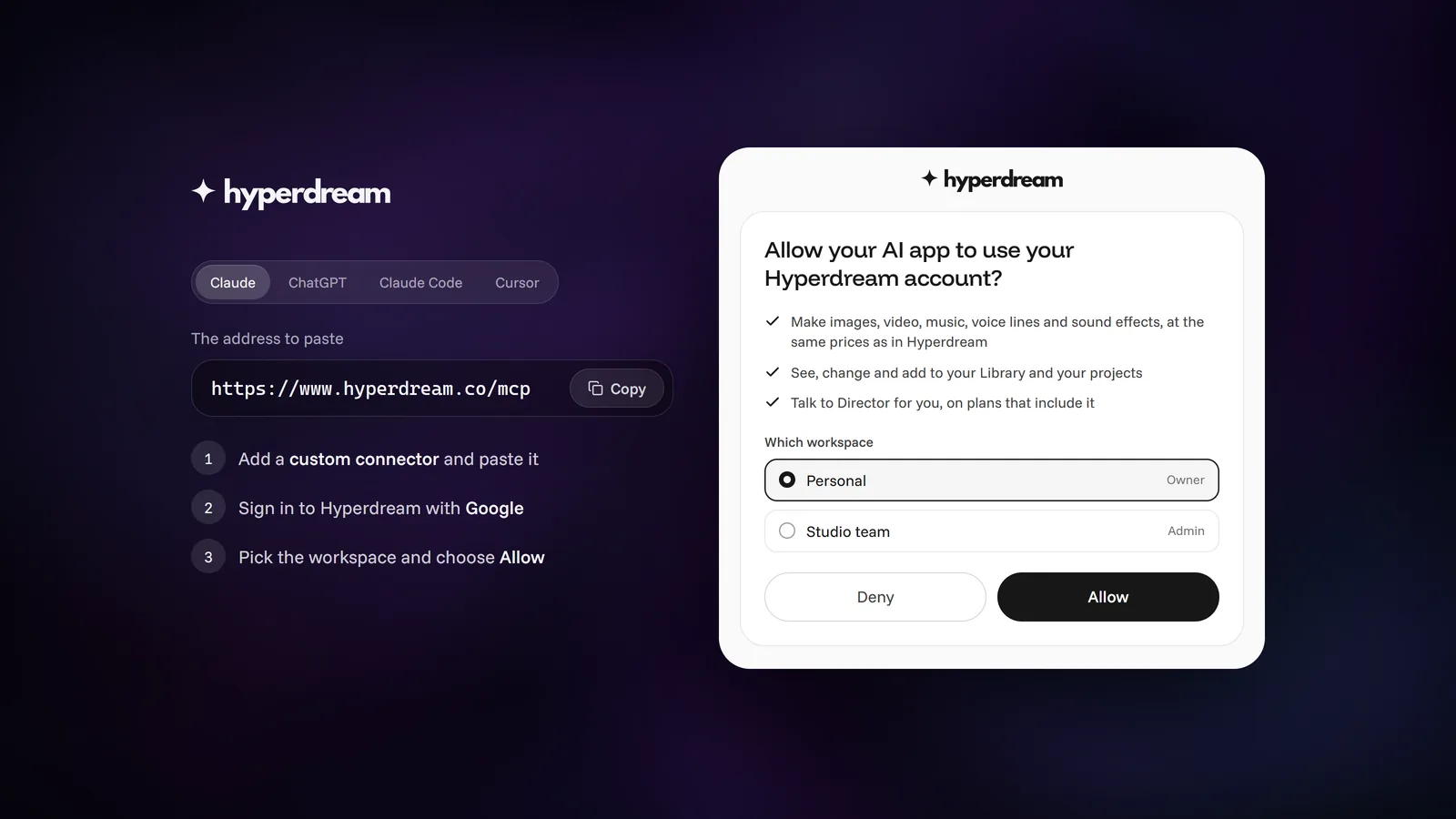
You sign in on Hyperdream's own page, with Google, and your password never reaches the assistant. The sign-in screen lists what the app will be able to do (make things with your credits, see and change your Library and projects, and talk to Director on plans that include it) and asks which workspace to connect.
There is no back door: every request from the assistant is checked against your account and your workspace role, the same checks the app makes, and the same content rules apply. You can see every connected app, which workspace it works in and when it was last used in Settings, then Connected tools, and disconnect any of them there. It stops working at once.
How do I connect?
Every app uses the same address:
https://www.hyperdream.co/mcp
In Claude it's Settings, then Connectors, then Add custom connector. In ChatGPT it's Plugins, then +, then Add custom MCP server. Claude Code takes one command, and Cursor has a one-click button. Each ends with signing in to Hyperdream and choosing Allow. Adding a custom connector needs ChatGPT Plus or Pro, or a paid Claude plan.
The step-by-step guide for each app has the exact steps, what to do if sign-in doesn't finish, and how to switch workspaces. The same steps, with a copy button for the address, are on the connect page.
What's next
Hyperdream is coming to ChatGPT's app directory, so you'll be able to add it from there without pasting an address. Until then, the custom connector above works today.
We'll keep adding to what the assistant can do as we add to Hyperdream. If something you ask for doesn't work the way you expect, write to hello@hyperdream.co. We read every message.
New to Hyperdream? What Hyperdream is has the short facts: plans, models and limits.
Questions people ask
Yes, with Hyperdream connected. Ask for a clip in plain words: the assistant picks a video model with you, shows the price, starts the render when you say go, and shows the clip in the chat when it's done. The clip is in your Hyperdream Library too.
Keep reading
Guides11 November 20266 min read
Connect ChatGPT, Claude or Cursor to Hyperdream (MCP Guide)
Step by step: add Hyperdream to ChatGPT, Claude, Claude Code or Cursor with one address and a sign-in, no API keys. Plus fixes for when sign-in doesn't finish.

For Teams10 November 20266 min read
Client Review Links: Comments and Approvals, No Account
How client approval for AI video works on Hyperdream: a review link, comments pinned to a spot or a moment, approve or request changes, and no account needed.

For Teams10 November 20269 min read
What Happens to Client Work on Hyperdream: Privacy Facts
Hyperdream privacy for client work: no AI training on your content, no selling data, who processes it, who can see it, and deletion for good after 30 days.
More than images and video
Scripts, storyboards, motion, and characters in every version. Each one on its own, or all of them in a film.

Write a script
An idea in, a properly formatted screenplay out. Edit any line, then board it or film it.

Board a storyboard
A panel for every shot, as AI stills or quick vector frames. Export it as a pitch deck.

Make motion
Titles, explainers and moving storyboards, drawn as vector animation by the AI you pick.

Characters, places, products
One subject in many versions, or new ideas for it. Every angle, look and light.
Your first film is one sentence away.
Free to start. Pay only for what you render.